How to Show Discount on MRP in myBillBook Invoices
Written By Team Flobiz
Last updated 7 months ago
Overview
Customers frequently ask "Kitna discount diya?" at the billing counter. If the discount off MRP is not clearly shown on the invoice, customers assume they received less and push for more negotiation.
myBillBook now lets you automatically show the discount given off MRP on your invoices. The discount is calculated as MRP minus Selling Price (before tax), and is displayed in both percentage (%) and rupee (₹) amount.
📌 Platform: Web, Android, and iOS. You need to enable MRP in Item Settings first.
What Is Discount on MRP?
Discount on MRP shows your customers exactly how much they're saving compared to the printed MRP of an item.
Formula: Discount on MRP = MRP − Selling Price (before tax)
Example: If an item's MRP is ₹500 and your Selling Price (before tax) is ₹400:
Discount on MRP = ₹100
Discount % = 20%
Invoice shows: Disc: 20% (₹100)
ℹ️ Note: Discount on MRP is only shown when the discount value is positive (i.e., Selling Price < MRP). If Selling Price equals or exceeds MRP, no discount is displayed.
Where You'll See Discount on MRP
1. Item Master – Pricing Details When MRP and Discount on MRP settings are enabled, you'll see a "Disc. on MRP" value below the MRP field in every item's Pricing Details section. An info icon beside MRP shows the formula used.
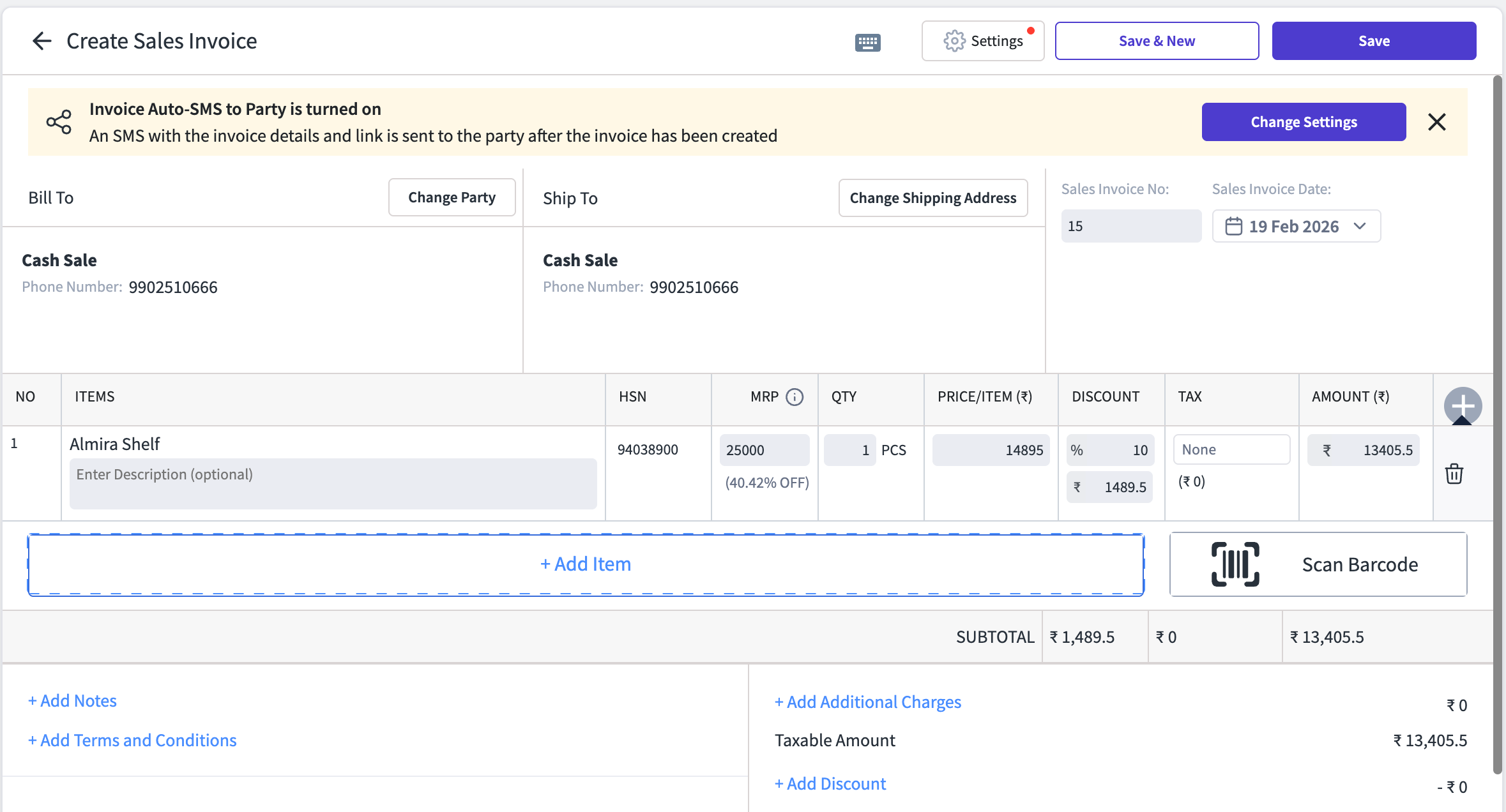
2. Invoice Creation Screen While creating a sales invoice, you'll see the MRP discount percentage displayed below the MRP value for each item added. This helps your staff verify the discount at the time of billing.
3. Invoice Preview & Final Invoice The discount on MRP appears on the invoice preview as well as the final printed/shared invoice. Your customer sees exactly how much they saved.
4. Applicable Voucher Types
Sales Invoice
Automated Bills
Quotation / Estimate
Proforma Invoice
Sales Return
Delivery Challan
⚠️ Not available in: Purchase Invoice, Debit Note, or any purchase-related vouchers. Discount on MRP is a sales-side feature only.
How to Enable Discount on MRP
Step 1: Open Item Settings
Go to the myBillBook Dashboard
In the left panel, click Items (Inventory)
Click the Settings (⚙️) icon at the top of the Items page
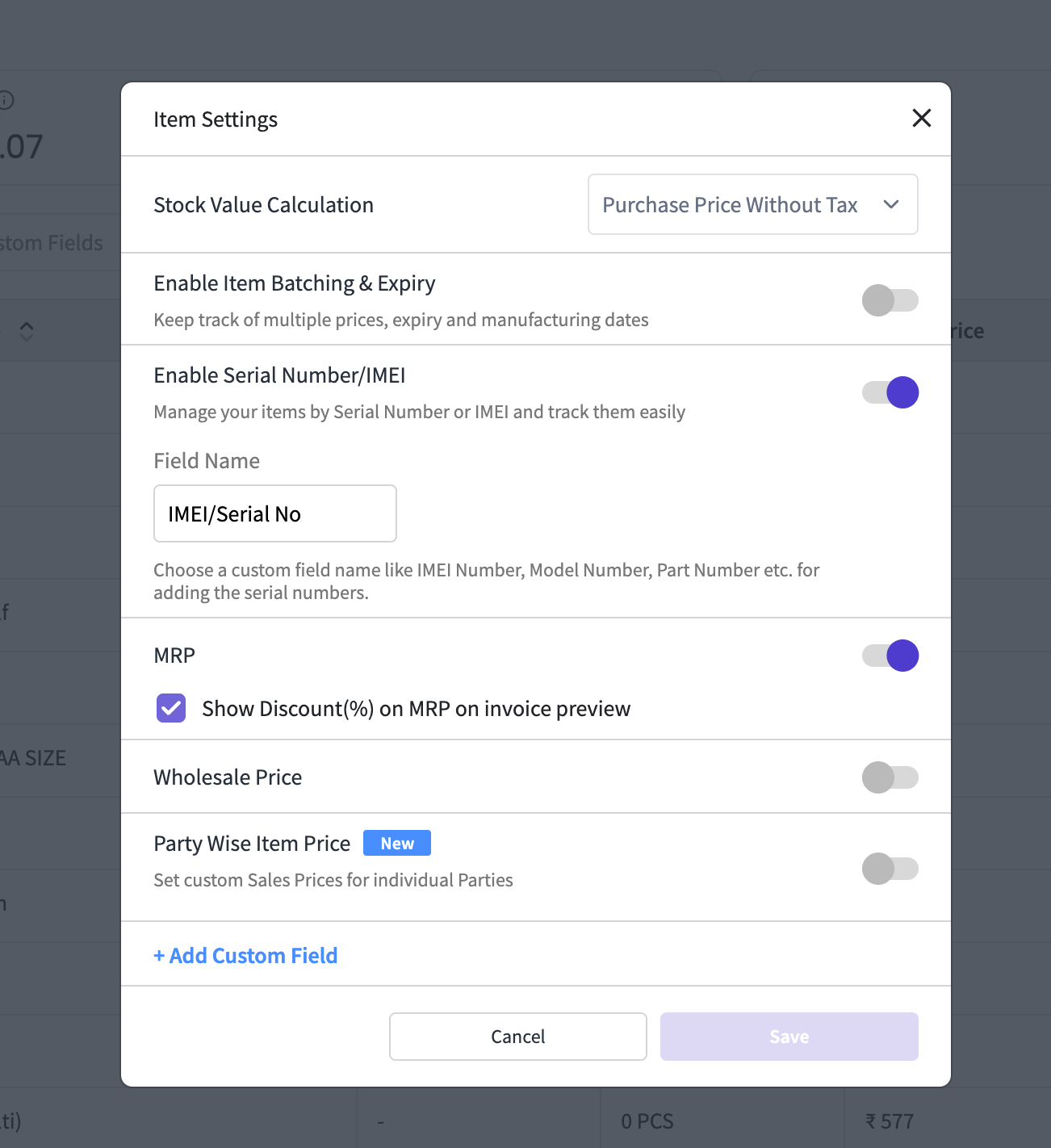
Step 2: Enable MRP
In Item Settings, find the MRP toggle and turn it ON
Once MRP is enabled, you'll see a checkbox: "Show discount percentage on MRP on invoice preview"
Check this box to enable Discount on MRP
Click Save
Step 3: See It in Action
Go to Sales → Create Sales Invoice (or click + Create Sale Invoice)
Add a Party (customer)
Add an item that has both MRP and Selling Price set
You'll see the MRP discount in % and ₹ value on the invoice line item
Preview or save the invoice — the discount on MRP appears on the final invoice as well
💡 Tip: Editing MRP directly on the invoice screen only changes it for that particular invoice. It does not update the MRP saved in your inventory.
Important Things to Know
Discount on MRP is only visible when the value is positive (SP before tax < MRP)
This feature applies to Goods items only. Service items do not have MRP, so no changes there.
The info icon beside MRP shows the exact formula for transparency
Same experience across Web, Android and iOS
User roles remain unchanged — existing role permissions apply
Enabling/disabling MRP also controls the Discount on MRP checkbox. If you disable MRP, both get turned off.
Frequently Asked Questions
Q: Does editing MRP on an invoice change my inventory? No. Editing MRP during invoice creation only affects that specific invoice. Your item's MRP in inventory stays unchanged.
Q: Will this show on thermal bills? Currently available on new thermal print templates on Web. Mobile thermal and old Web thermal templates do not show Discount on MRP yet to avoid clutter. This may be added in a future update based on user feedback.
Q: What if my Selling Price is higher than MRP? No discount is displayed. The Discount on MRP field will show "Disc: –" or remain hidden, since the value is not positive.
Q: Can I turn this off later? Yes. Go to Item Settings, uncheck "Show discount percentage on MRP on invoice preview," and save. Discount on MRP will stop appearing on new invoices. Past invoices remain unchanged.
Was this helpful?
Still need help? Share an idea