How to Sort and Filter Invoices During Payment Settlement
Written By Team Flobiz
Last updated 4 months ago
Overview
Finding the right invoices during payment settlement can be time-consuming, especially when dealing with multiple outstanding invoices.
With the new sorting and filtering options in Payment In, you can quickly organize invoices and settle payments based on your preferred workflow.
What's New
Sort Invoices During Payment Settlement
You can now sort invoices using:
Invoice Date
Due Date
Both options support:
Ascending order
Descending order
This helps you prioritize invoices based on due dates, invoice age, or recent transactions.
Filter Invoices by Date Range
Need to settle payments for a specific period?
Use the Date Range filter to display only relevant invoices.
This is useful when:
Settling monthly payments
Reconciling a specific billing period
Managing large numbers of outstanding invoices
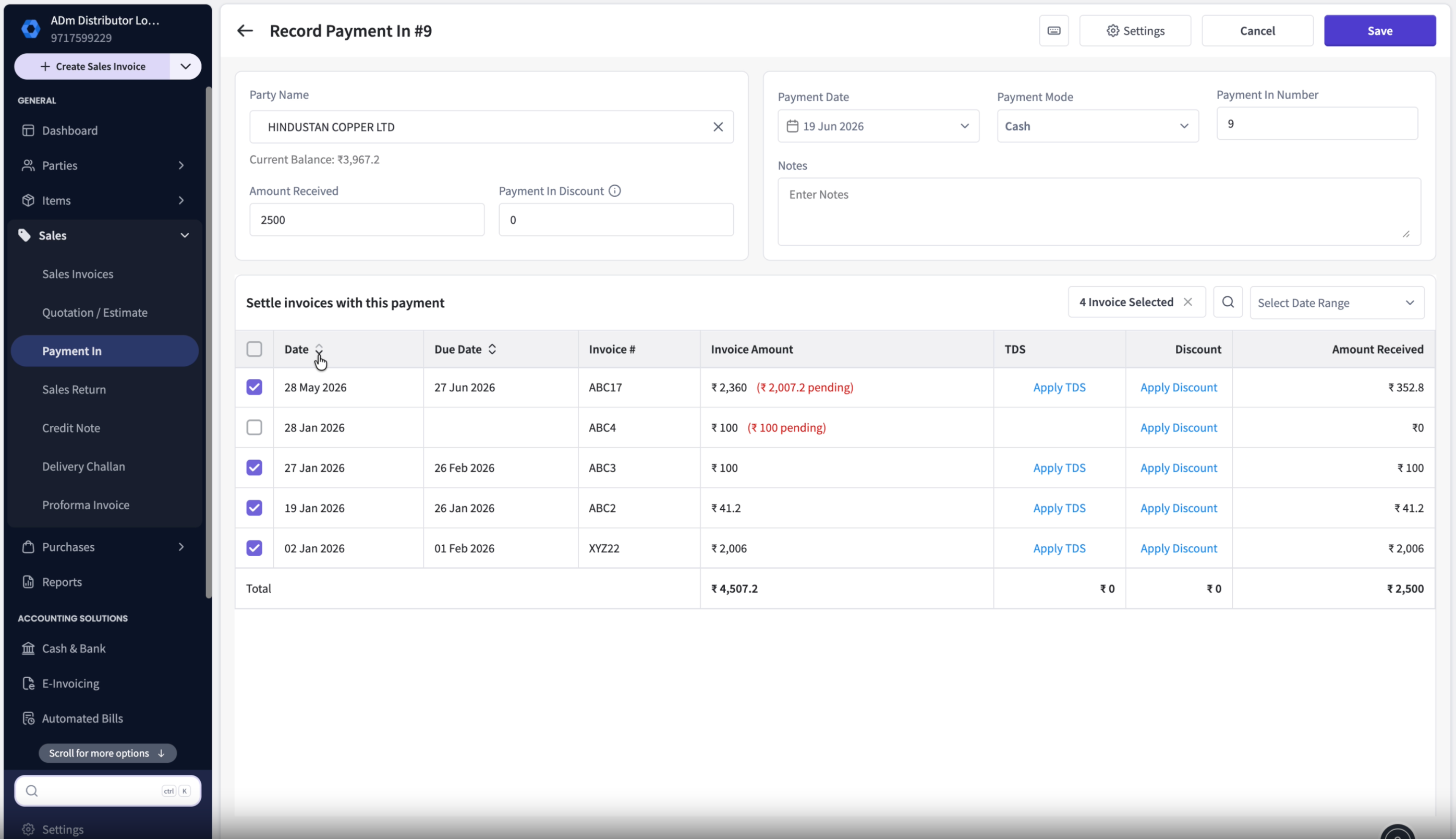
Selected Invoices Stay on Top
When you select invoices and continue editing the settlement, those invoices remain pinned at the top of the list.
This reduces scrolling and helps prevent settlement mistakes.
FAQs
Can I sort invoices by due date?
Can I sort invoices by due date?
Yes. You can sort invoices by either Due Date or Invoice Date.
Can I choose ascending or descending order?
Can I choose ascending or descending order?
Yes. Both sorting options support ascending and descending order.
Will the date filter affect my invoices permanently?
Will the date filter affect my invoices permanently?
No. The filter only changes which invoices are displayed during the current settlement process.
Why are selected invoices shown at the top?
Why are selected invoices shown at the top?
This makes settlement easier by keeping the invoices you're working on visible throughout the process.
Can I remove the date filter after applying it?
Can I remove the date filter after applying it?
Yes. You can clear or modify the filter at any time.
Was this helpful?
Still need help? Share an idea