How to Sort and Filter Invoices During Payment Settlement
Written By Team Flobiz
Last updated 3 months ago
Overview
Finding the right invoices during payment settlement can be time-consuming, especially when dealing with multiple outstanding invoices.
With the new sorting and filtering options in Payment In, you can quickly organize invoices and settle payments based on your preferred workflow.
What's New
Sort Invoices During Payment Settlement
You can now sort invoices using:
Invoice Date
Due Date
Both options support:
Ascending order
Descending order
This helps you prioritize invoices based on due dates, invoice age, or recent transactions.
Filter Invoices by Date Range
Need to settle payments for a specific period?
Use the Date Range filter to display only relevant invoices.
This is useful when:
Settling monthly payments
Reconciling a specific billing period
Managing large numbers of outstanding invoices
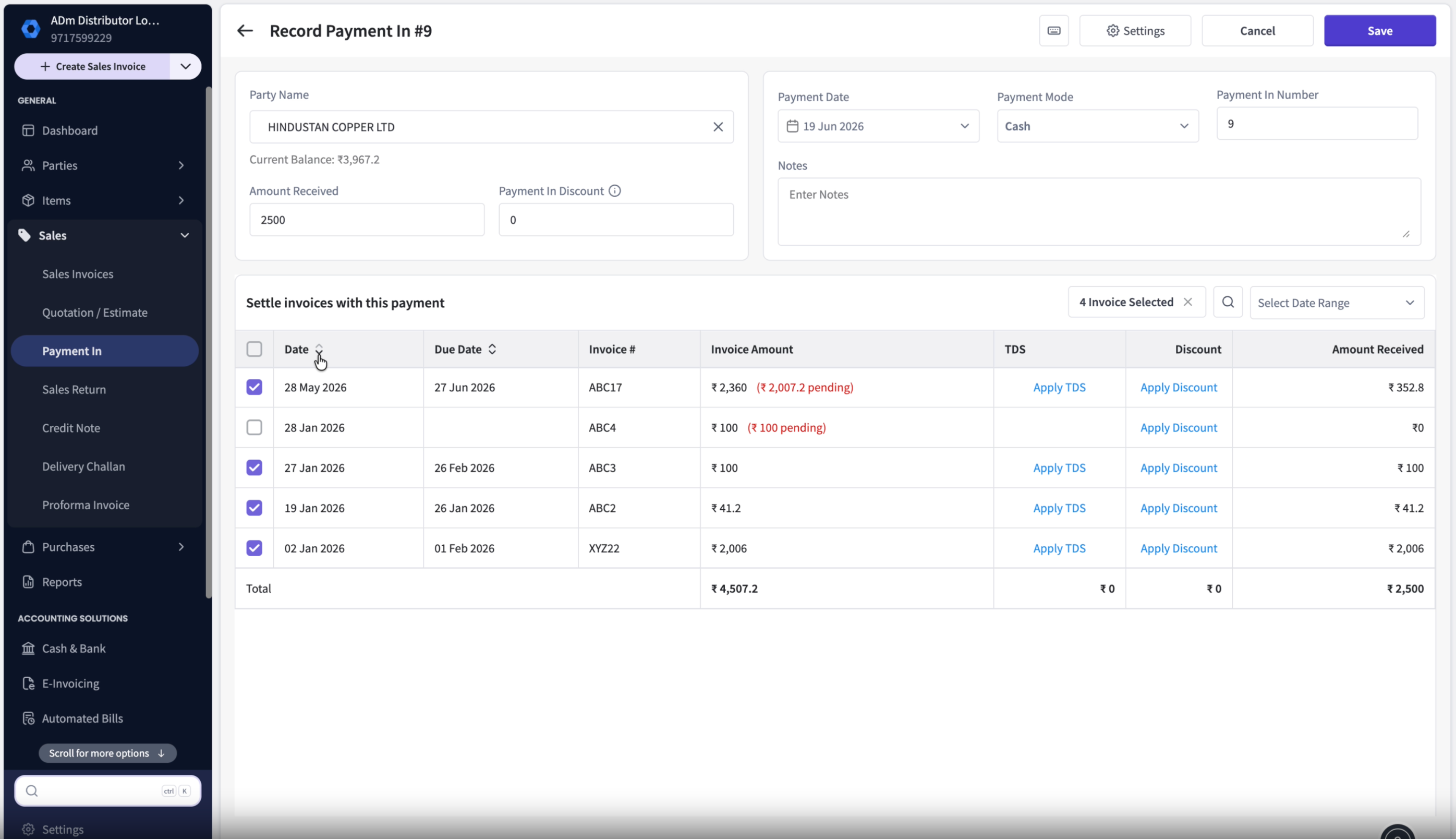
Selected Invoices Stay on Top
When you select invoices and continue editing the settlement, those invoices remain pinned at the top of the list.
This reduces scrolling and helps prevent settlement mistakes.